Showing posts with label ZIPslim. Show all posts

Sunday, July 18, 2010

KrzYoptimizer v1.10 finally out

You want to REDUCE SIZE of your PNG or JPG files to reduce traffic on your website? Maybe you just want your banners or other images to open faster on slow connections?
This program is for you!


All in one Optimizer for PNG, JPG, JAR, ZIP and GZ files.


Another version of KrzYoptimizer is out! This time a lot of changes were made that should make the program easier to use and have better functionality. Changelog:
- Totally rewritten working on files:
* Now only one file from zip is extracted at a time
* ZIP archive is optimized file per file
* Program can read compressed file size from loaded archive
- Added new icon
- Added Deflate file subitem
- Added ability to process multiple ZIP/JAR/GZ files
- Added ability to mix ZIPfiles with standalone PNG/JPG images
- Added: DELETE key on selected items in list deletes them from list
(good incase you don't want to optimize 0 byte files in zip archive - waste of time)
- Added DiffB (Difference bytes) that shows how many bytes were saved per file
- Added terminating of running Shell process to avoid errors on deleting temporary files
- Removed Save, Save As and Close menu items (they are no longer necessary because
program now bases on listview items and updates files dynamically)
- Deleted Debug Code (will be back later, was unfinished anyway)
- Changed Open ZIP/JAR/GZ file to Add ZIP/JAR/GZ file
- Changed quit message
- Code optimization (filesize greatly reduced)

So now program works mainly on Listview... Almost all data it needs to properly process files is there. In previous versions it was only to show how much of data was processed. Now it's really program's database, since it processes file by file as they would be loaded separatelly. Even every file in ZIP is done separatelly.
What does that mean? You can easly delete files you don't want to process in zipfile at runtime (as long as the file wasn't or is not being optimized) and Deflate Archive is reducing its size everytime a file inside is optimized. Program doesn't require [extraced_archive_size]b of disk space anymore. It extracts one file at a time then deletes it from temp directory when optimization ends.

As there is new feature to delete not yet processed files anytime, 'DELETE' key and multiselect functionality were added to ListView.

This version fixes bug when not all of temporary files were deleted when program was closing. This time it forces all running shell processes to terminate before getting rid of all work data.

You can now load multiple ZIP files and even mix them with JPG/PNG files being outside of archive as long as it's before You press START button.

That's all the features. Program does not yet support resuming function as ZIPslim does (even though a lot of time passed and versions were released already), but it's easy to skip already processed files (as long as You remember which one was last processed) by simply, selecting them on list and then pressing 'DELETE' key (maybe I will add some logfile in next version to help You to find out which file it stopped processing at).

Download:
KrzYoptimizer Version 1.10

Website:
http://freya.neostrada.pl

Thursday, July 15, 2010

KrzYoptimizer v1.09 and v1.10-pre !!!

You want to REDUCE SIZE of your PNG or JPG files to reduce traffic on your website? Maybe you just want your banners or other images to open faster on slow connections?
This program is for you!


All in one Optimizer for PNG, JPG, JAR, ZIP and GZ files.


This version has been up for 2 days but I didn't have enough time to post it here (sorry busy with rl)... Anyway version 1.09 changelog:

- Fixed, blocked Listview editing that could corrupt results
- Added forcing of first block search range (some files don't want to reduce size at
1-16)
- Added some additional checks to loading config file
- Changed Open PNG/JPG files... to Add PNG/JPG files that dynamically adds new files
to already populated list view...
- Clearing list question when adding files to a list that contains already optimized files


STARTING FROM VERSION 1.10 ZIP OPTYMIZATION ALGORITHM IS REWRITTEN A BIT, benefits:
- required space to run optimization reduced from [extracted_archive_size] to [extracted_file_to_optimize_size]
- archive is updated everytime file in list optimization is done
- 'd' key on selected item in list can easly remove file (incase some of them are already optimized and you don't want to waste time on them)
- smaller exe (less code)
- more


Version 1.10-pre changelog:
- Totally rewritten working on files:
* Now only one file from zip is extracted at a time
* ZIP archive is optymized file per file
* Program can read compressed file size from loaded archive
- Added: DELETE key on selected list item deletes file from list
(good incase you don't want to optimize 0 byte files in zip archive - waste of time)
- Added DiffB (Difference bytes) that shows how many bytes were saved per file
- Added terminating of running Shell process to avoid errors on deleting temporary files
- Changed quit message

Download:
Version 1.09
Version 1.10-pre (alpha)

Homepage

Saturday, July 10, 2010

KrzYoptimizer v1.08 and v1.09-pre !!!

You want to REDUCE SIZE of your PNG or JPG files to reduce traffic on your website? Maybe you just want your banners or other images to open faster on slow connections?
This program is for you!

All in one Optimizer for PNG, JPG, JAR, ZIP and GZ files.

One day has passed and another version is out. This time a lot of things were changed/added/fixed. Mainly GUI is a bit different now as you can see on the picture below:


Few crash errors were fixed. You can download and use it and write feedback here as a comment. This will help me a lot. List of changes till now: Changelog. All files can downloaded here.

If you don't want to navigate away from this blog, you can directly download:
- KrzYoptimizer v1.08 as ZIP
- KrzYoptimizer v1.09-pre as EXE

Friday, July 9, 2010

KrzYoptimize v1.07

All programs can be found here

This time it took a while... whew... Not really that much of work needed to be done to take this much of time, but I got somewhat busy with real life (no time to work on it at work - other project at work was priority, even though nobody asked me to do, I did it for myself for easier telephon numbers listing). There were also other projects running there like String2chr or NEW (not yet up) String to 6BH, this one is still in beta stage and works only on text-boxes, not real files although it would be capable to (not yet converting backwards but I already worked out all mathematic here).

Now let's get back to the thing I should be writing about.


What's in this version? Check the pricture, you can notice new List view that looks muuuuuuch nicer than old one. Anyway, list of changes:

- Changed how zipslim works:
* 7-zip now recompresses all files in normal method
* each file is now recompressed with 7-zip (mfb=258, pass=32) before K-zip
- Added ListView Box instead of plain ListBox:
* File - file path+name
* Size - uncompressed or unoptimized/original file size (incase of JPG/PNGslim)
* Compressed - compressed or optimized file size
* Ratio - Compression Ratio (compressed size/original size * 100%)
* S - State: D, P (D - Done, P - Processing
- Added ability to download/update program's CRC file
- Added CRC textboxes and CRC button - click to check if program CRC matches
- Added resize ability
- change to Total progress:
* don't update progress and label when restarting Random Huffman, just fix it to old value
(less computations and not going ahead of operation progress)
- Code organising

All programs can be found here

Sunday, July 4, 2010

KrzYoptimizer v1.04 revision 2

Again there is another release of KrzYoptimizer. Since last post I added:
- Added PNGslim (alpha):
* works only on external files
* WRITES FILE TO DISK while optimizing
* doesn't fully interact with gui
- Menu
- Now you need to File->Open file
- After optimization you need to File->Save (As) file
- Added Preconfigured modes:
* Fast: Max Blocks Limit = 16, Random = 10
* Medium - 128 and 100
* Extreme - 2048 and 1000
* Custom - confgured in settings.

Some v1.03 screenshot, interface is the same in v1.04.2:

Wednesday, June 30, 2010

KrzYoptimizer v1.02 is out

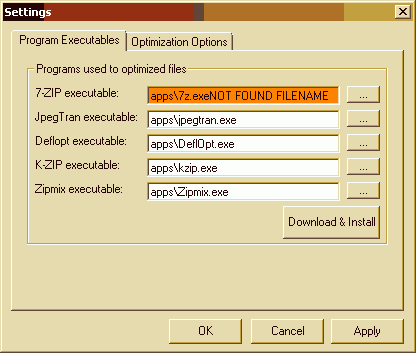
Version 1.02 is out, it features Download & Install button that will automatically download and install all applications necessary to run optimizer. It also marks on-fly Text Boxes by changing their color to orange if program can't be found:


Tuesday, June 29, 2010

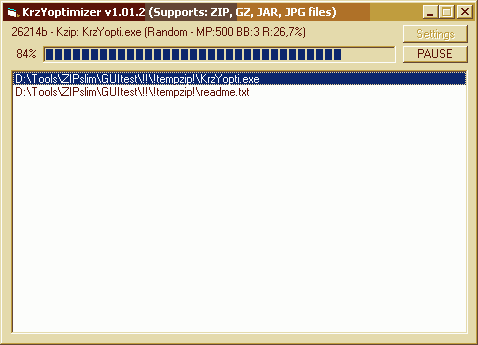
KrzYoptimizer v1.01.2 (formerly ZIPslimGUI)

For all this time I was coding this front-end application. Starting from spare time at work to 2h past midnight, sleeping 5h and so on... I think today I will give it a rest, at least a bit =P

So it now has a nice and simple GUI:


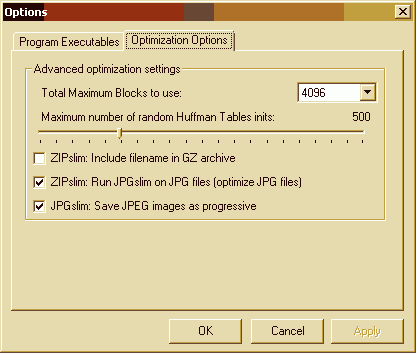
and some cool advanced optimization settings:


I have written a short guide on how to set it up and use on My Homepage. If you are interested, Please, read, download and use it. It's really worth it in my opinion.

Why I'm doing this? Simply for myself. First time when I compressed a file on a computer I was 11-13 years old, LOL, and I was like "OMG IT GIVES SMALLZ FILAZ?!", arj/zip times =D. Guess what? I'm still into it. I like tools that DO optimize things, especially if it's not just about: "wow WinRAR, Best compression... um? That's all?", you know what I'm saying, the ability to get better results after putting some mysterious 'pb=3' (um? what? yes, 7-zip, doesn't mean gasoline =P) or better one '/rn' (LOL random Huffman Tables! K-ZIP)... And of course I'm doint it for You as well, because it wouldn't be available for download if I didn't, and there is a big thing comming UP! PNG file optimization based on Andrew C.E. Dent script named PNGslim (as it was converted to VBS by Me, it will as well be in VB6 EXE :) using a set of tools like optipng, advdef, pngout, pngrewrite and others.

So check out my website!

Sunday, June 27, 2010

ZIPslim GUI v1.0-pre?

YES! It's finally out, ZIPslimGUI! The 7-zip/kzip frontend (png, jpg, bmp and gz to be done later):


It has no config file and optimizes zip files only. It doesn't support resuming.
Doh, It's pre-release there is a lot of work to do to make it as functional (or even more) as ZIPslim is =)

Thursday, June 24, 2010

ZIPslim v0.991

How about GZ? Kzip by default DOESN'T support this file type. Lately I got in touch with a lot of tar.gz files due to my adventure with fun_plug for ZyXEL. I thought: "too bad I can't optimize these".

Until today. I have 4 spare days, including this one. I did research how GNUzip header/footer is built since I know it uses the same compression method ZIP does. Basically Deflate filestream is the same and you can notice GZ files being ~100 bytes smaller. So I managed to recreate artifical GZ header [1F 8B 08 00 00 00 00 00 02 00]. First two bytes would be fixed GZ file ID, 3rd is compression method meaning Deflate [08], next one is Null because we don't want to put filename inside archive saving [filename length]+1 bytes (it's not actually good idea to save it w/o filename inside since I know few internet services, like not existing savefile, that modified filename) - I may add ini switch to turn this on or off later. Starting from byte 5 I decided to skip (cause I'm lazy) time/date conversion to GNUzip specs so there are 4 Nulls (meaning it's the same as archive creation date). At byte 9 I decided to always use 02 since it means that it was packed with maximum compression (the thing 7-zip and kzip do) and last one is fixed 00 to let decompressor know that header ends here. If you want you can open it through Xvi32 or other hex editor and change header byte 4 [1F 8B 08 ->00<-] to 08 and add at the end of header filename.extension (00) so it will look like this: 1F 8B 08 08 00 00 00 00 02 00 asciifilenamehere.extension 00.

Let's check the ZIP footer. There is a lot of crap GNUzip don't want to see. Basically only things GZ wants is: 4 bytes long CRC written from right to left [reverse order] in hex format, and 4 bytes long file size written similar way. So the script coppies this and deletes anything else.

In order to use this feature you will need to reinstall script by running '0reinstall ZIPslim.bat' or by downloading and installing Xvi32 and editing ZIPslim.ini: add xvi32EXE=locationtoyourxvi32.exe for example 'xvi32EXE=apps\XVI32.exe'. Conversion is done by modifing HEX data of file with Xvi32 script file.

So that's how ZIPslim v0.991 was made, changelog:
- Changed Install zipslim.bat to 0reinstall zipslim.bat for EZ reinstalling.
- Reverted animation to old Moving Slash one
- Xvi32 added to main package to convert ZIP to GZ.
- GNUzip (.gz) extension support [ALPHA!]
* no support for file date (same as archive)
* no support for file name inside archive (same as archive minus .gz)
* it just converts ZIP to GZ by modifing ZIP header/footer to meet GZ specification.
*** PLEASE RUN 0reinstall zipslim.bat!
- Update to PNGslim display
- Fix for processing next files when resuming when BestBlocks was larger
than 16!
- Fix to PNGslim display: when file was detected as grayscale script
didn't display "Filters" text.


You can download it at http://freya.neostrada.pl

Tuesday, June 22, 2010

ZIPslim v0.99

ZIPslim was updated to v0.99 today! What's new:
- 7-ZIP module updated (please delete/rename ZIPslim.ini to reinstall)
- Fix for resuming when BestBlock was larger than 16!
- Added short Legend
- Changed KSflating display a bit (now it's Kzip). It features Real Time updating of number of MaxBlocks/MaxPass, BestBlock and Compression Ratio.

You can download it at: http://freya.neostrada.pl

Monday, June 21, 2010

Updated 7-ZIP for ZIPslim

I did update 7-ZIP for ZIPslim. To update you would need to rename ZIPslim.ini to something else and delete apps directory, run ZIPslim and wait for it to reinstall itself. Delete new ZIPslim.ini and rename back your old ini file to ZIPslim.ini

or you can install it manually by extracting:
http://freya.neostrada.pl/7z.cab to your apps directory.


Please NOTE! There is no 7za.exe x64 version currently available... If you have x64 system you will need to use x86 version. It's only used for extracting and compressing once per optimization so I think it's OK for now.

Sunday, June 13, 2010

ZIPslim

This time I was working on some Visual Basic Script. The idea came from Andrew C.E. Dent's PNGslim script that optimizes PNG files.

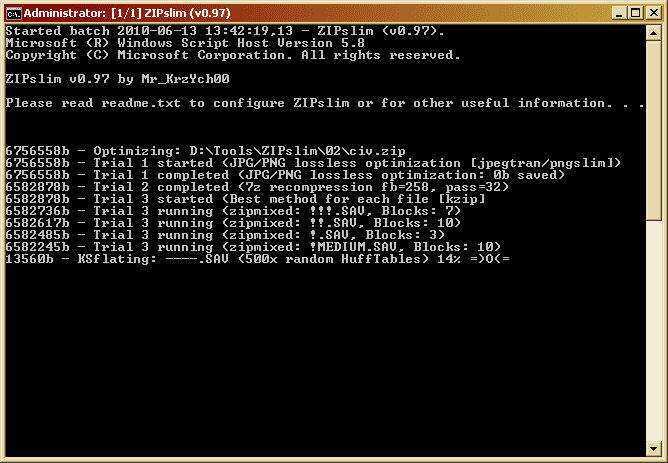
ZIPslim in progress:


Actually I wrote testkzip script before discovering Andrew's invention. It was not open to public and It was simple and buggy (not really that much but still). It was based on my test script (similar to PNGslim but used only pngout and deflopt resulting in files being larger that one produced by his script).

At the beginning of this month I said to myself "how about doing something similar to PNGslim" but when I viewed his cmd file I thought "I'm sick of this cmd based script that isn't really programming language". Then I got an idea to write this in pure VBScript using few cmd commands (like dir or md) because of lazyness. =P

So I did the prototype and then I mainly converted my testkzip.cmd script there fixing few bugs. Guess what? It did optimize ZIP files pretty well (faster than cmd version), although it did support only one file inside zip and crashed on directories a lot =D

I think I got addicted to VBs again (previously I did Visual MinShare for DC Hub from NeoModus when I was 15 years old - almost 10 years ago). I can't stop adding things, everything that comes to my mind needs to be put there... be it at home, friend's house or even at work =)

Basically it's so automated that it even downloads and installs all necessary files directly from the internet (don't be scared when some window pop-ups while installing, it DOES NO HARM to your computer and it's necessary for things to run smooth and fast). It's at v0.97 by now (starting from v0.90) and can not only process ZIP files. It additionally accepts JAR, JPG, PNG and BMP files, all thanks to those people that worked hard to reduce every bit of uneccessary information, BIG THANKS!

You can download it at http://freya.neostrada.pl for free !
Don't forget to visit http://freya.neostrada.pl/ZIPslim-ip.txt to get information what programs are used to gain such cool results!


PLEASE! Report all bugs here as commets, Thanks!

Mr_KrzYch00
~~~~~~~~~~~